Statement conversion for UK & Irish bookkeepers
Parseledger turns PDFs and photos of bank statements into accounting-ready CSV, Excel, QuickBooks and Xero files — and proves every figure against the statement's own arithmetic before you're asked to trust it. Nothing is exported on faith.
Free tier, no card. 10 pages a month.

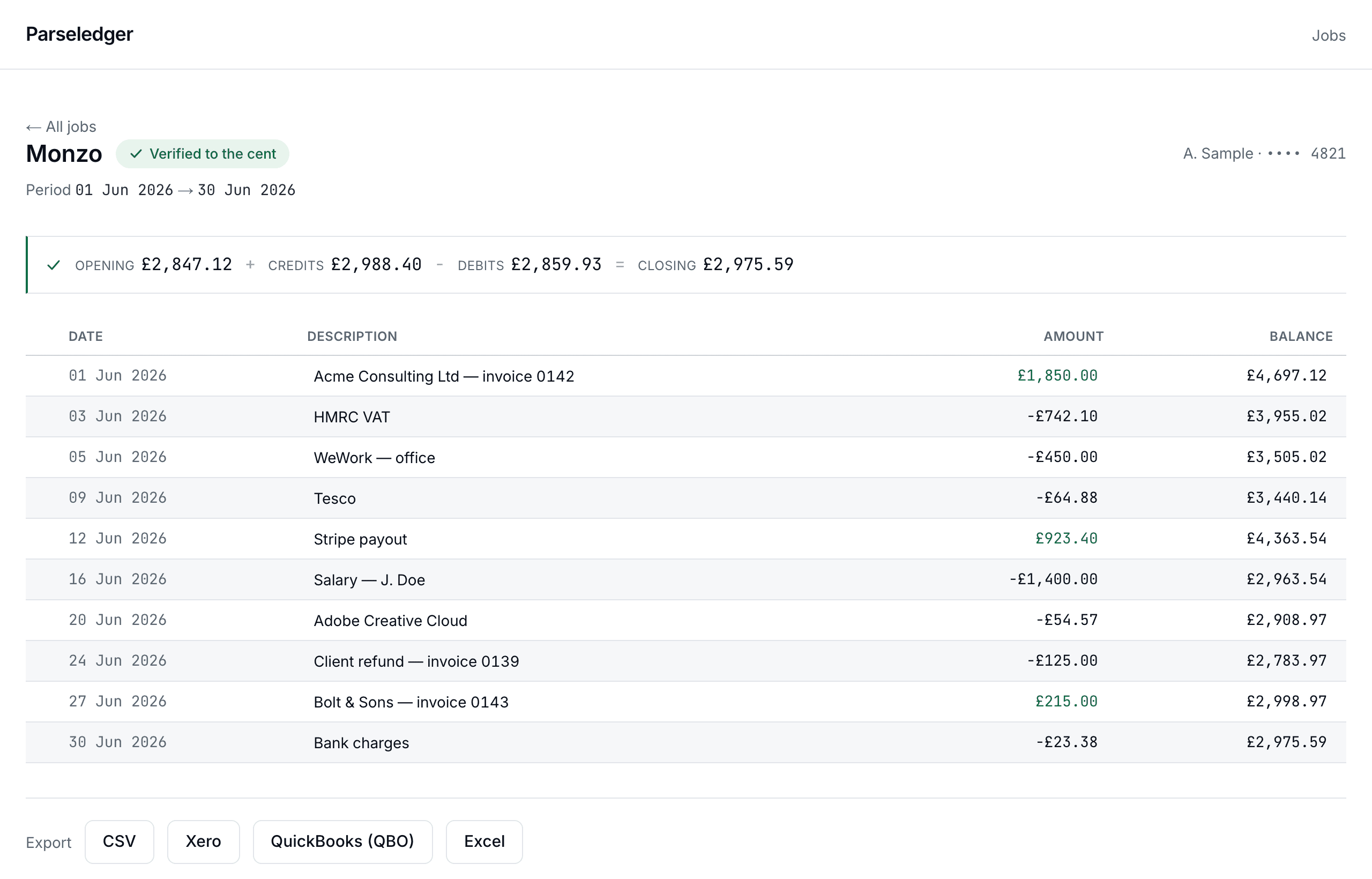
| Date | Description | Amount | Balance |
|---|---|---|---|
| Opening balance | |||
| 06-012026-06-01 | Acme Consulting Ltd — invoice 0142 | ||
| 06-032026-06-03 | HMRC VAT | ||
| 06-052026-06-05 | WeWork — office | ||
| 06-092026-06-09 | Tesco | ||
| 06-122026-06-12 | Stripe payout | ||
| 06-162026-06-16 | Salary — J. Doe | ||
| 06-202026-06-20 | Adobe Creative Cloud | ||
| 06-242026-06-24 | Client refund — invoice 0139 | ||
| 06-272026-06-27 | Bolt & Sons — invoice 0143 | ||
| 06-302026-06-30 | Bank charges | ||
| Closing balance | |||
This is the check every statement goes through. Try fixing the flagged row — the amount was misread as 68.44; the statement says 64.88.
Live demo — this is the real verification engine. Click the flagged amount and fix it.
Statement layouts covered at launch — UK & Ireland
The review screen
This is what a misread digit looks like here
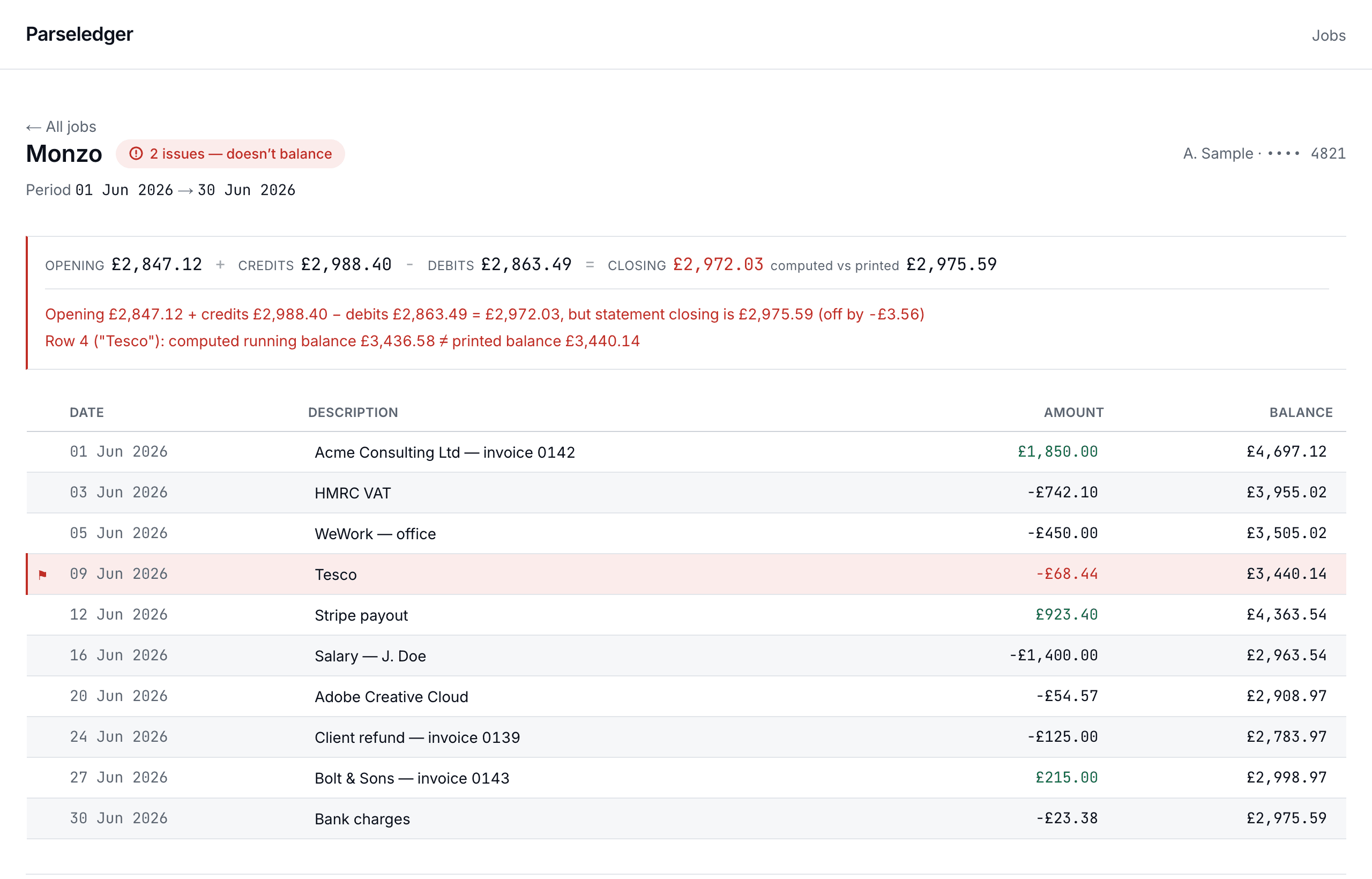
A real statement in review: the equation is off by −£3.56, the responsible row carries the flag, and the computed closing sits beside the printed one. Nothing to hunt for — the error is already found.
Built like the ledger it feeds.
independent checks on every statement, before anything earns the badge
floating-point operations on money — every figure is integer minor units
maximum file retention. Statements are purged once you have your export
UK & Irish banks covered at launch, from Monzo to Bank of Ireland
Why verification
Parsing was never the hard part
Any converter can read a statement. Most of the time, most of them read it correctly. The problem is the other times: a 6 read as an 8, a debit filed as a credit, a row silently dropped from a fold-creased scan. The output is a spreadsheet that looks perfectly plausible — and reconciles wrong three weeks later, when finding the error costs an afternoon.
Bank statements carry their own proof. The opening balance, every transaction and the closing balance form an identity that either holds or doesn't. Parseledger computes it on every statement, in integer arithmetic, to the penny — the same arithmetic your ledger will face.
That changes what an error looks like. Instead of a wrong number hiding in a clean-looking export, it's a red flag on the exact row that broke the equation, waiting for a ten-second fix — before the data ever leaves the page.
The ledger entry
What the engine does, in five movements
The ledger entry
What the engine does, in five movements
… 5 more rows
68.44 corrected to 64.88 — the identity re-ran on the keystroke and closed to the penny.
The workflow
From statement to ledger, without the re-keying
A quarter of statements used to be an evening of manual entry and a second evening of finding the typo. Here it is four steps, and the second evening doesn't exist.
Source — page 2 of 4
03 Jun HMRC VAT QTR ending 31 May 742.10 D
05 Jun WEWORK LONDON REF 8841 450.00 D
09 Jun TESCO STORES 6642 64.88 D
12 Jun STRIPE PAYOUT ST-K92 923.40 C
— fold crease, slight skew, 200dpi —
Extracted
| 2026-06-03 | HMRC VAT | −742.10 |
| 2026-06-05 | WeWork — office | −450.00 |
| 2026-06-09 | Tesco | −64.88 |
| 2026-06-12 | Stripe payout | +923.40 |
01
Extract
Drop a PDF export from a banking app, a posted original scanned at the office, or a phone photo taken at a client’s kitchen table. Native PDFs take a fast text path; images go through a vision model. Multi-page statements come through as one continuous record, in statement order.
Amounts are captured exactly as printed — signs, separators, CR/DR markers — then normalised into integer pence.
Source — page 2 of 4
03 Jun HMRC VAT QTR ending 31 May 742.10 D
05 Jun WEWORK LONDON REF 8841 450.00 D
09 Jun TESCO STORES 6642 64.88 D
12 Jun STRIPE PAYOUT ST-K92 923.40 C
— fold crease, slight skew, 200dpi —
Extracted
| 2026-06-03 | HMRC VAT | −742.10 |
| 2026-06-05 | WeWork — office | −450.00 |
| 2026-06-09 | Tesco | −64.88 |
| 2026-06-12 | Stripe payout | +923.40 |
02
Verify
Both checks execute the moment extraction finishes. If the statement’s own identity holds, it arrives already wearing the badge. If it doesn’t, the reconciliation bar shows exactly how far off it is — computed closing against printed closing — and which rows are responsible.
A statement with no printed running balances still gets the totals check; one bad digit can’t hide either way.
- Row 4 (“Tesco”): computed running balance £3,436.58 ≠ printed balance £3,440.14
- Closing balance is off by −£3.56
03
Review
Flagged rows are highlighted in the review table with the printed balance beside the computed one. Click the cell, type what the paper actually says, and reconciliation re-runs on every keystroke. When the last issue clears, the badge flips to green in front of you.
Review is a deliberate step, not a formality — this is financial data, and the product never pretends otherwise.
| Date | Description | Amount | Balance |
|---|---|---|---|
| 2026-06-05 | WeWork — office | −450.00 | 3,505.02 |
| 2026-06-09 | Tesco | 68.44 | 3,440.14 |
| 2026-06-12 | Stripe payout | +923.40 | 4,363.54 |
04
Export
A verified statement exports to CSV, Excel, QuickBooks (.qbo) and Xero-formatted CSV — files that import cleanly, with dates and signs the way each tool expects them. An unverified statement can still be exported, but only through an explicit choice.
Descriptions are sanitised against spreadsheet formula injection — a small thing, until the day it isn’t.
- monzo-2026-06-30.csvCSV
- monzo-2026-06-30.xlsxExcel
- monzo-2026-06-30.qboQuickBooks
- monzo-2026-06-30-xero.csvXero
Who it's for
Built around a bookkeeper's month
The solo bookkeeper
A dozen clients, statements arriving as app exports, paper and the occasional photograph. The job is to get them into Xero accurately — and to be able to say so.
- Convert a statement and be reviewing it in under a minute
- Verification badge to lean on when a client questions a figure
- Solo plan covers 150 pages a month at a flat $24
- Overflow at $9 per 100 pages that never expires — quiet months cost nothing extra
The growing practice
Hundreds of statements a month across staff and clients. The risk isn't one wrong number — it's not knowing which of ten thousand numbers is wrong.
- Client folders keep every engagement’s statements and exports separate
- Batch upload a quarter of statements and review them in one sitting
- Every manual correction is recorded — an audit trail you can stand behind
- Practice plan: 3,000 pages, unlimited users and API access at $149
The workspace
A quarter of statements, one sitting
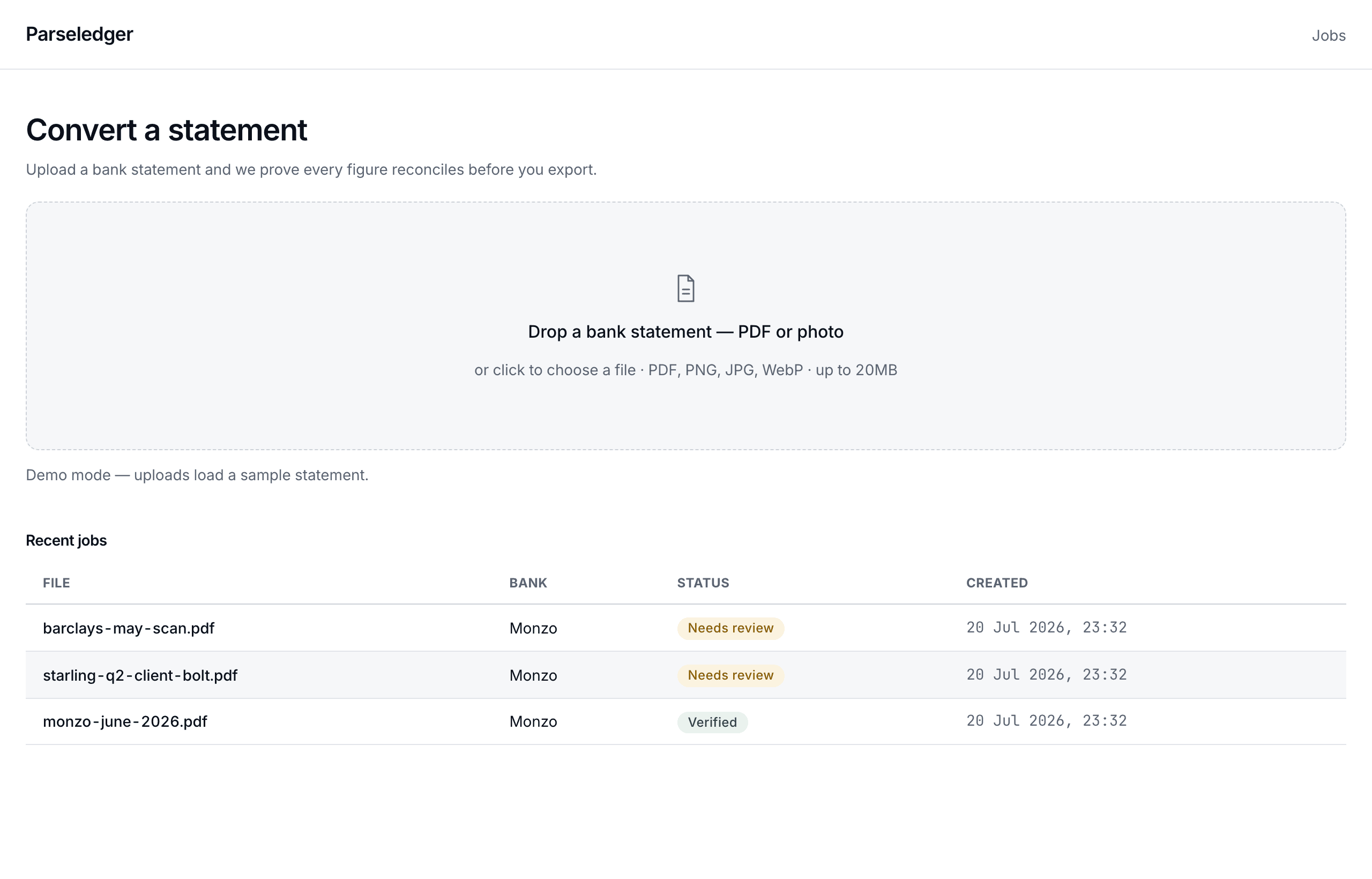
Drop the month's statements in one go. Each job carries its verification status in the list — Verified, Needs review, or failed — so you triage at a glance and spend your attention only where a flag is waiting.
Client folders and batch upload arrive with the Practice plan; the workspace is the same speed at ten statements or three hundred.
Coverage
The statements UK and Irish bookkeepers actually receive
US-centric converters treat a Monzo export and an AIB paper statement as afterthoughts. They are our beachhead: app-generated PDFs, quarterly posted originals, and the phone photos clients send at month-end — each bank's real layouts, not a generic parser squinting at them.
United Kingdom
Using another bank? Upload the statement anyway — verification tells you within a minute whether the extraction held up.
Exports
Files that import first time
Each exporter writes what the destination actually expects — Xero's dd/mm/yyyy dates and signed amounts, QuickBooks' OFX structure with stable transaction IDs, Excel with real numeric cells rather than text pretending to be numbers.
Xero
A pre-mapped CSV that Xero accepts directly in Bank accounts → Import a statement, with dates, amounts and payee columns already in the order Xero expects.
QuickBooks
A 3-column or 4-column CSV formatted for QuickBooks Online bank feeds, importable via Transactions → Bank transactions → Upload from file.
Excel
An .xlsx workbook with typed date and currency columns, a transactions sheet and a reconciliation summary — ready for pivot tables and lookups without re-formatting.
CSV
A clean, UTF-8 comma-separated file with ISO dates and signed amounts — the neutral format every ledger, script and spreadsheet can ingest.
Privacy
Your clients' statements are not our asset
EU data residency
Files are stored and processed in the EU, on infrastructure chosen for it — not routed wherever compute is cheapest.
24-hour purge
Uploads exist to be converted, not collected. Once the job is done, the source files are deleted automatically.
No training on your data
Statements are never used to train models. Your clients’ transactions stay your clients’ transactions.
Encrypted throughout
TLS in transit, encryption at rest, and a database that no public key can reach.
The full arrangement, in plain language, on the security page.
Pricing
Flat plans, one engine
Every tier runs the same verification. The difference is volume, seats and workflow — never accuracy.
| Free | $0 | 10 pages a month, no card — the full engine, small doses |
| Solo | $24/mo | 150 pages, every export format, one user |
| Pro | $59/mo | 750 pages, batch upload, three users — most practices land here |
| Practice | $149/mo | 3,000 pages, unlimited users, client folders, API, audit trail |
Pay as you go on any tier: $9 per 100 pages, never expires. Annual billing takes Solo to $19 and Pro to $49.
Questions
Asked before trusting us with the books
Fair questions. Financial data deserves direct answers.
How accurate is the extraction?
Accurate enough to be checked, which is the point. Every statement is put through two independent tests — the totals equation and a line-by-line running-balance check — before anything is exported. When extraction misreads a digit, the arithmetic breaks and the exact row is flagged. You are never asked to trust an unverified number.
Does it work on scanned statements and phone photos?
Yes. Native PDFs take a fast text path; scans and photos go through a vision model. Either way the output faces the same verification: a blurry photo that produces a wrong digit will fail reconciliation and be flagged, not silently exported.
What happens when a statement doesn’t reconcile?
The statement stays in review. The reconciliation bar shows the computed closing balance against the printed one, and each broken row carries a flag. You correct the cell — the equation re-runs live as you type — and the badge flips to Verified only when every check passes. Exporting an unverified statement is possible, but it requires an explicit choice.
Which banks are supported?
Fifteen UK and Irish banks at launch, including Monzo, Starling, Revolut, Barclays, Lloyds, HSBC, NatWest, AIB and Bank of Ireland — the statement layouts UK and Irish bookkeepers actually receive. Other banks usually work too; the verification engine tells you immediately whether the extraction held up.
How do I get the data into Xero or QuickBooks?
Export a Xero-formatted CSV and import it under Bank accounts → Import a statement, or download a .qbo file and use QuickBooks’ Upload from file. Plain CSV and Excel exports are there for everything else. Import steps for each are on the Xero and QuickBooks pages.
What happens to my files?
Uploads are processed in the EU, kept only while the job needs them, and purged automatically after 24 hours. We never train models on your data. The exported files are yours; the security page describes the full arrangement in plain language.
What does it cost?
The free tier converts 10 pages a month with no card. Solo is $24 a month for 150 pages, Pro is $59 for 750, Practice is $149 for 3,000 with client folders and API access. Overflow pages cost $9 per 100 and never expire, on any tier.
Is this accounting advice?
No. Parseledger converts and verifies bank statement data. It does not categorise transactions for tax purposes or provide accounting, tax or financial advice — that judgement stays with you.
The first statement takes a minute. The badge takes zero errors.
10 free pages a month. No card.